Introducing Gamma AI and Smallppt
1.What is Gamma AI
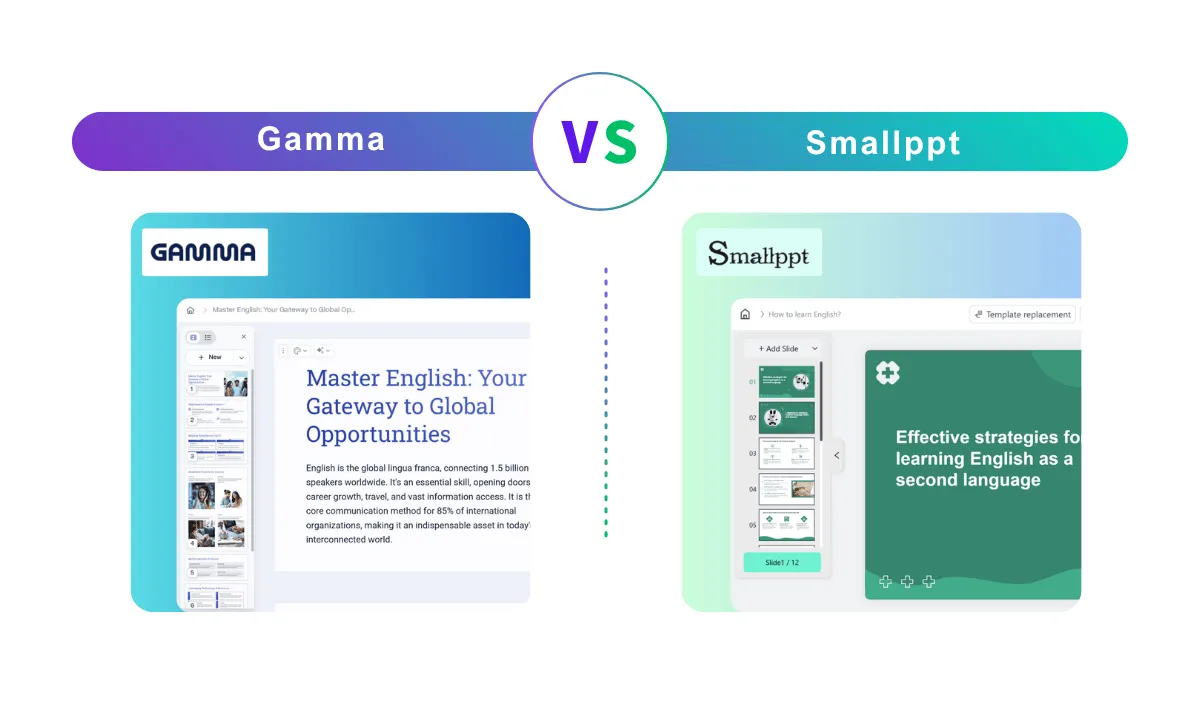
Gamma AI is a fresh take on creating and sharing ideas. Instead of sticking to the usual PowerPoint format, Gamma helps you build interactive, web-based documents that feel more like a narrative than a slideshow.

It uses "cards" (content blocks) that you can stack and style however you like. Ultimately, a Gamma presentation looks and feels more like a modern mini-website than a traditional deck.
2.What is Smallppt
If you're short on time and need slides fast, Smallppt is the free AI presentation maker I always turn to. It's simple, fast, and delivers clean, professional presentations without any design hassle. Just type in your topic or paste an outline, and Smallppt's AI takes care of the rest—instantly.

Whether you're a student racing a deadline, a busy marketer, or just someone who dreads formatting slides, this AI presentation maker saves you time and stress. No learning curve, no paywall—just smart results, ready to download.
Both Gamma and Smallppt represent the next generation of AI presentation maker free tools, each with unique approaches to simplifying content creation.

Gamma vs Smallppt: Feature-by-Feature Comparison
How Does Gamma Work
Originally built as a rebel against the rigid "anti-PowerPoint" aesthetic, Gamma AI is rethinking how we share ideas. Instead of the usual clunky, static decks, Gamma uses a "scrollable" format that feels more like a modern website than a traditional presentation. By trading old-school slides for dynamic, vertically stacked cards, it gives you way more breathing room for layout and design.
As the platform evolved, it leaned heavily into AI. Now, you can spin up full presentations, detailed documents, or visual stories just by typing a quick prompt or dropping in some raw text.
- Prompt-to-Presentation: Just tell the AI what you need, and it builds the content for you.
- Flexible Templates: Fast formatting and layout swaps that actually look good.
- Rich Media: Seamless drag-and-drop for videos, GIFs, and live charts.
- One-Click Restyling: Change the entire look of a project instantly while keeping things consistent.
- Web-Ready Publishing: Share your work as a live link with built-in analytics and version tracking.
- Real-Time Collaboration: Work together using comments, reactions, and shared editing tools.
Why I Reach for Smallppt When I Need Slides—Fast
If you're looking for a fast, practical alternative to Gamma AI, Smallppt is built for speed, simplicity, and real-world use.

Features of Smallppt
✅ Clean, intuitive interface
✅ Traditional slide format (not web-style)
✅ Download as PPTX or PDF—ready to present
✅ Lightning-fast generation with minimal edits
✅ Works great as a free AI presentation maker
✅ No learning curve—just type, click, and download
Whether you're a student, marketer, or team leader, Smallppt gives you everything you need to create polished decks in minutes. It’s the perfect solution for anyone who needs an AI presentation maker free from complexity, cost, or delays. That’s why I recommend this, even though it was only released recently.
So far, over 50,000 users worldwide have already trusted Smallppt to streamline their presentation creation.
How I Use Gamma and Smallppt (Step by Step)
1.How to Use Gamma AI
Gamma is a web-based tool that focuses on card-style, AI-assisted storytelling.

Step 1: Go to gamma.app and sign up or log in.
Step 2: Click “New Document” to start creating.
Step 3: Choose a theme or template. Gamma will help you generate an outline.
Step 4: Use the editor to add “cards” — these are the blocks that make up your gamma AI presentation.
Step 5: Customize content using text, images, embeds, and charts. You can also ask AI to rewrite content.
Step 6: Click “Present” or “Share” to send your link. Your gamma AI presentation is hosted online, like a webpage.
2.How to Use Smallppt
Smallppt is designed to turn your ideas into slides—fast, clean, and ready to download.
Step 1: Visit smallppt.com/AI-powerpoint.
Step 2: Choose a generation mode:
• Paste full content (outline, script, notes, etc.)
Step 3: Click “Generate with AI”. Smallppt will create a full slide deck based on your input.
Step 4: Choose your preferred theme from professionally designed templates.
Step 5: Preview your slides, make edits if needed.
Step 6: Download your deck in PPTX or PDF format—or use it online instantly.
Which AI Presentation Tool Should You Use?
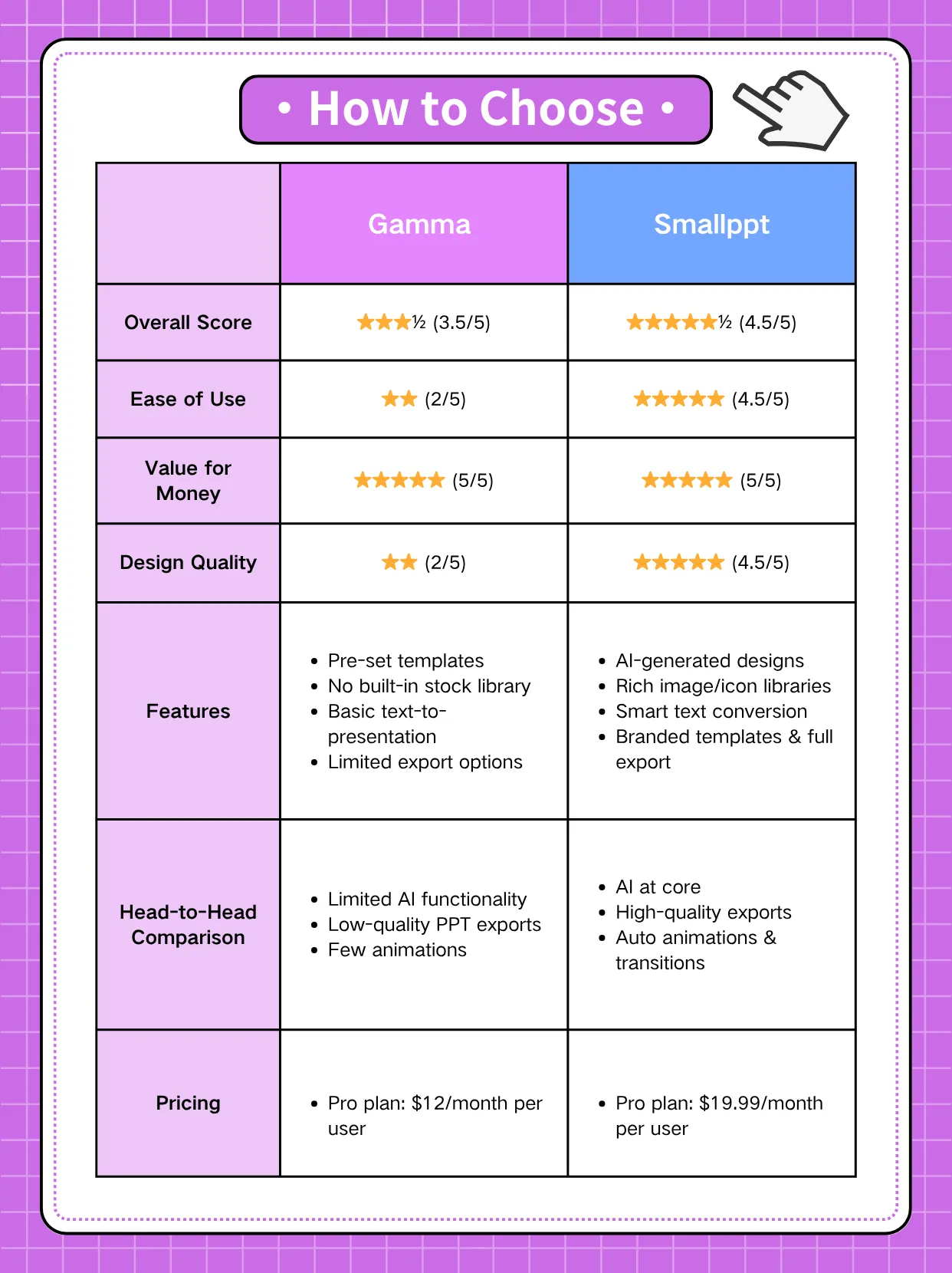
Both Gamma AI and Smallppt are solid choices in the presentation maker AI space—but they serve different needs.
• Want something web-based and interactive? Gamma AI is worth a shot.
• Need a clean, downloadable deck—fast and free? Smallppt is your go-to.
No complicated interface. No hidden paywall. Just smart AI doing the hard work.
👉 Ready to skip the design stress? Try Smallppt — your free AI presentation maker that turns ideas into slides in seconds.